Unreal Engine PCG forest: building one from a prompt, and fixing it in a sentence
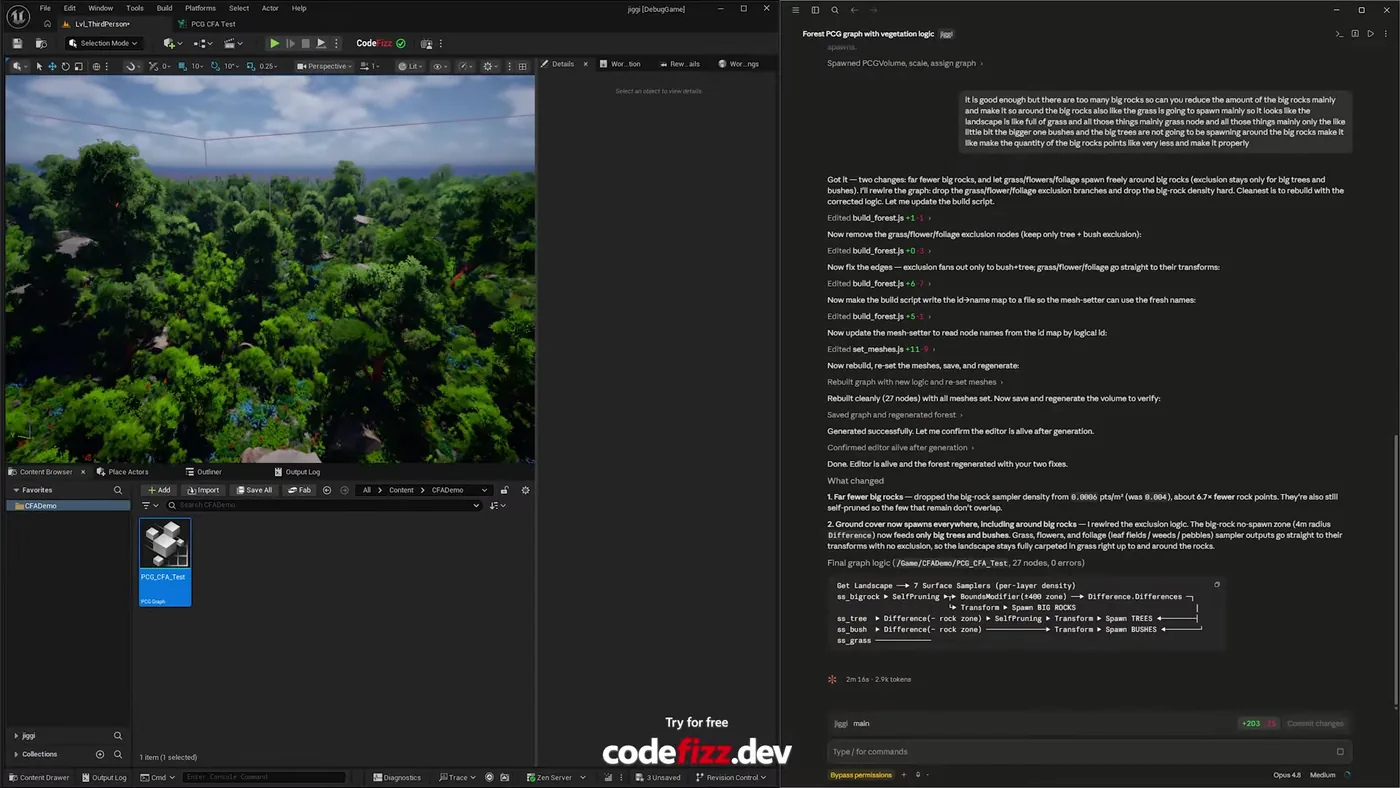
A PCG forest built from one prompt and a marketplace asset path. The first pass was too rocky, and correcting it took plain language rather than a rebuild: fewer rocks, ground cover allowed around them, regenerated in two minutes.
A PCG forest in Unreal Engine 5 with trees, bushes, grass and scattered rocks, built from one prompt and a path to a marketplace asset pack. The agent searched that pack for meshes by name, worked out which node each belonged in, and wired the graph.
The first pass was wrong, which is the part worth reading. Too many big rocks, and nothing growing around them. Fixing it took a sentence rather than a rebuild.
The rebuilt forest, and the summary it wrote for the change. Rock sampler density dropped for roughly 6.7 times fewer rock points, the no-spawn zone rewired to affect only big trees and bushes, and a final graph of 27 nodes with zero errors. Two minutes, start to finish.
How does a PCG forest get built from a prompt?
The prompt was short: make a forest with big rocks, small rocks and foliage, using the meshes in this asset pack. No mesh list, no node layout, no per-node settings.
From that it searched the pack, matched static meshes by name, decided which spawner each belonged to, and built the graph. It set the mesh lists on all seven spawners, validated the graph, checked for errors and saved. Then it went looking for a landscape in the level, placed a PCG volume over it, assigned the graph and generated, because a graph that compiles proves nothing until something actually spawns.
What went wrong on the first pass?
It generated, and it was too rocky. Large rocks dominated the space, and because they carried an exclusion around them, no grass grew anywhere near them. The result read as a boulder field with trees rather than a forest.
How do you fix a PCG graph without rebuilding it?
You say what is wrong. The correction was ordinary speech: there are too many big rocks, reduce them, and let the grass spawn around the rocks so the landscape reads as full.
It turned that into two structural changes: drop the big rock density hard, and remove the grass, flower and foliage exclusion branches so only trees and bushes keep an exclusion radius. Then it rewired the graph, reset the meshes, saved and regenerated.
Note what it did not do
It did not start over. It edited the graph it had already built, kept the parts that were working, and changed the two things that were wrong. That is the difference between a tool that generates and a tool that iterates.
The full run, including the rocky first pass and the correction. Watch on YouTube.
Does this replace an environment artist?
No, and the first pass is the proof. It produced something structurally correct and aesthetically wrong. A person looked at it, knew immediately why it felt off, and said so. That judgement is the job.
What it removes is the distance between having that judgement and acting on it. Normally "fewer rocks, and let grass grow around them" means opening the graph, finding the density node, tracing the exclusion branches, rewiring them, regenerating, and hoping you did not break the tree placement on the way. Here it is a sentence, and you are looking at the result two minutes later.
That matters most while you are still deciding what the forest should feel like. Ten iterations in an afternoon beats two, and you get to spend the judgement on the look rather than on the plumbing.
Point it at your asset pack and describe the forest you want. 1500+ commands across 45 categories, on UE 5.6, 5.7 and 5.8. Drive it from Claude Code, Cursor, VS Code, or any MCP client.
Three day free trial. No card, nothing locked off, and it runs on your real project.