Unreal Engine water material: a stylized ocean built without touching a node
Gerstner waves across several octaves in one Custom HLSL node, normals derived analytically rather than sampled, foam split into its own function. What got built, what failed and self-corrected, and why the exposed parameters matter more than the material.
A stylized ocean in Unreal Engine 5, with wave and foam control, no Water plugin, and not a single node placed by hand. It came out of one prompt in a couple of minutes.
The interesting part is not that it got built. It is what you are left holding afterwards: a working material with every value you would want to art-direct exposed as a parameter, which is a starting point rather than a finished thing.
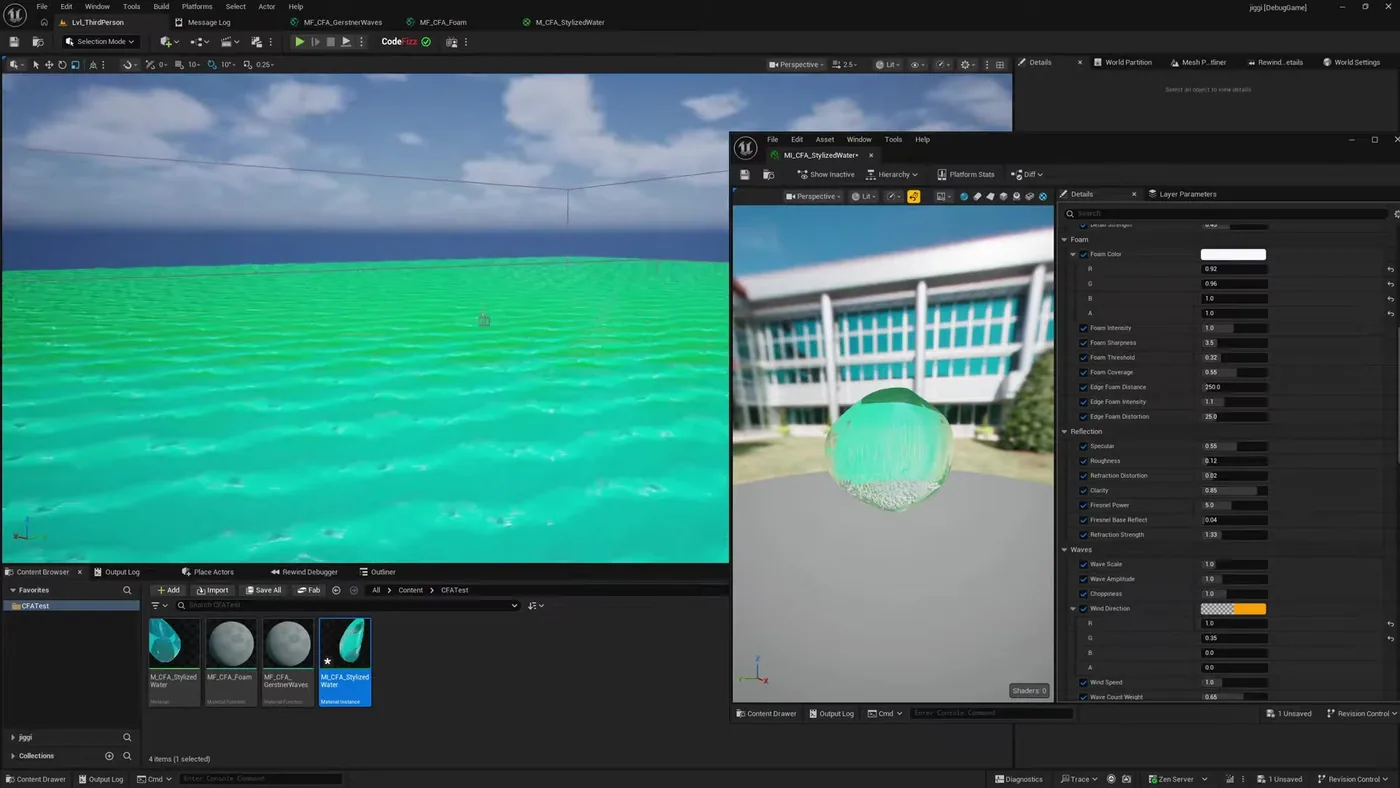
The result, and the actual point of it. On the right are the parameters left exposed: foam colour, sharpness, coverage, wave scale, amplitude, choppiness, wind direction and speed. Nothing there needs the graph reopening to change.
What it actually wrote
Not a noise texture panned around. It wrote Gerstner waves summed across several octaves inside a single Custom HLSL node, each layer with its own wavelength, amplitude, steepness and direction.
Then the detail that made me sit up: it derived the normals analytically from the wave function rather than sampling a normal map. That is the correct way to do it and it is not the obvious way. A normal map would have looked fine in a still and wrong in motion.
It split the work into two material functions, one for the waves and one for the foam, feeding a single water material. Four assets came out: the material, the two functions, and a material instance to drive it from.
It compiled, failed, and fixed itself
HLSL written blind does not compile first time. What matters is what happens next. It read the compile error back out of Unreal, corrected the code, and recompiled, without being told what was wrong.
It finished clean at 2005 pixel instructions, then cleared out the orphan nodes it had left behind while iterating.
This is the whole difference
Anything can emit plausible HLSL. A tool that can compile it, read the errors, and correct itself is doing the job. One that cannot is handing you a first draft and a debugging session.
Why the parameters matter more than the material
This is not a replacement for an artist and I would not pretend otherwise. The ocean it produced is a competent generic ocean. It is not your ocean, and the gap between those two is the entire job.
What changes is where you start. Building a Gerstner wave stack with analytic normals and a foam pass by hand is most of a day for someone who has done it before, and considerably more for someone who has not. Getting that in two minutes means the day is spent on the part that actually needs taste: pushing choppiness until it feels like the right sea, pulling foam coverage back, finding the colour.
And when a slider is not enough, you describe the change instead of rebuilding. Ask for the foam to break later on the wave face, or the detail to stop swimming when the mesh is scaled, and it edits the graph it already wrote.
The full run, including the prompt, the failed compile, and the parameter walkthrough. Watch on YouTube.
Where it does not help
If you already know exactly what you want and have built it before, you will be faster by hand for anything small. The gain shows up on work that is structurally fiddly rather than creatively hard: the wave maths, the function split, the parameter plumbing, the orphan cleanup.
It also will not tell you the ocean is wrong for your game. It builds what you described, at the quality of your description. Vague prompt, generic ocean.
Going further
The same approach applied to a Niagara solar system is in the Niagara post, and every material command is listed in the materials reference. More runs like this one are on the demo page.
Try it on your own project
CodeFizz Editor Agent
One prompt, four assets, and every value still yours to change. 1500+ commands across 45 categories, on UE 5.6, 5.7 and 5.8. Drive it from Claude Code, Cursor, VS Code, or any MCP client.
Three day free trial. No card, nothing locked off, and it runs on your real project.