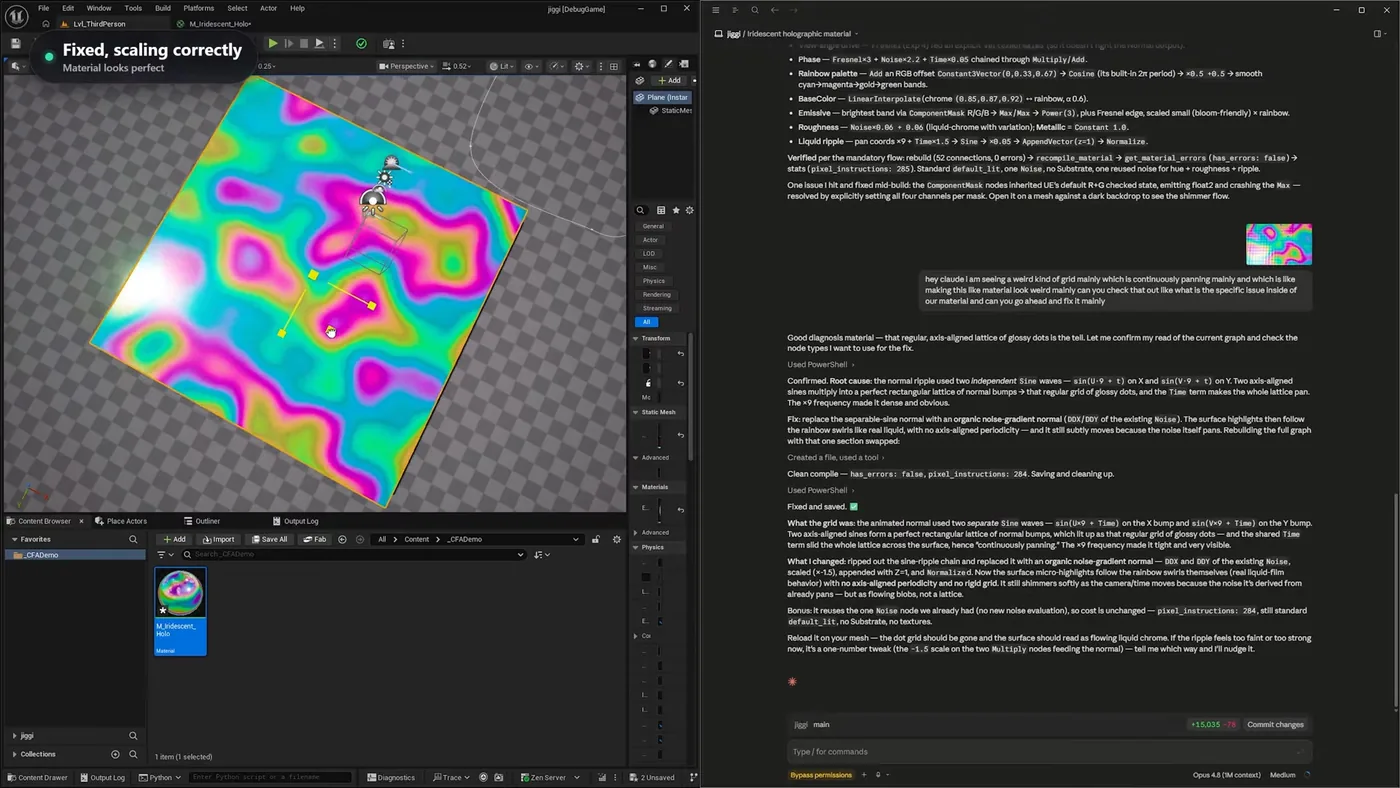
How to make a material in Unreal Engine 5 by describing it, and debug it by screenshot
Build a material from a description, rebuild it with stock nodes instead of Custom HLSL, then fix a bug that compiles clean but looks wrong. The report was a screenshot and a sentence. What came back was a root cause.
You describe the material you want and it gets built in the editor, as a real graph you can open and edit. Then the useful part: when something looks wrong, you screenshot it, say what you are seeing in ordinary words, and it works out why.
That debugging loop is worth more than the initial build, because knowing a material looks off is easy and knowing which node is causing it is not.
The fix, and how it was found. The report was just a screenshot and a sentence about a weird grid that kept panning. The diagnosis underneath is the agent's: two independent sine waves multiplying into a perfect rectangular lattice, with the Time term sliding the whole thing across the surface.
How do you make a material in Unreal Engine 5 from a description?
You write what you want and it builds it in the editor. Not code to paste in afterwards. The asset lands in your content browser and you can open the graph, read every node, and change anything.
For an iridescent holographic look that meant a Fresnel driving the view angle, a rainbow palette built from an RGB offset through a cosine, a base colour interpolating between chrome and that rainbow, an emissive band for the bloom-friendly highlight, and a liquid ripple panning the coordinates over time.
Custom HLSL or normal material nodes?
Either, and it is worth knowing you get the choice. The first version used a Custom HLSL node, which is compact and fast to write. Then the same material was rebuilt using only stock Unreal nodes, no HLSL anywhere.
That matters if your team has a rule against Custom nodes, if you want artists to be able to read the graph, or if you are targeting a platform where you would rather stay on the standard node path. Ask for one, get one. Ask for it rebuilt the other way, and it does that too.
It reads compile errors and fixes them
Rebuilding with raw nodes threw an error partway through. It read the error out of Unreal, understood what had gone wrong, and corrected it without being told what the problem was.
How do you debug a material that looks wrong but compiles fine?
This is the hard case. The material compiled clean and looked wrong in the world: a regular grid of glossy dots sliding continuously across the surface. There is no error message for that.
The report was a screenshot and a sentence saying there is a weird grid that keeps panning, please look at it and fix it. No node named, no theory offered.
What came back was a root cause. The normal ripple used two independent sine waves, one across U and one across V. Two axis-aligned sines multiplied together make a perfect rectangular lattice of normal bumps, which is the grid of glossy dots, and the shared time term slid that whole lattice across the surface. The high frequency made it tight and obvious.
The fix was to replace the separable sine normal with an organic noise-gradient normal, taken from the derivatives of the noise that was already in the graph. The highlights then follow the rainbow swirls like real liquid, with no axis-aligned periodicity, and it still moves because the noise itself pans.
It reused what was already there
The fix takes the derivative of the existing Noise node rather than adding a new one, so the cost did not change. It finished at 284 pixel instructions, still standard lit, no Substrate, no textures. That is the kind of decision that separates a fix from a patch.
The full run: the HLSL version, the raw node rebuild, and the grid bug being diagnosed and fixed. Watch on YouTube.
Does this replace a material artist?
No. Notice who spotted the grid. A person looked at the surface, felt that it read wrong, and said so. Nothing in the pipeline flagged it, because nothing was broken in a way software can detect.
What it changes is what happens after you notice. Normally "there is a weird panning grid" means opening the graph, reasoning about why two sines might beat against each other, trying a different normal, recompiling, and checking again. That is an afternoon if you already know what to look for and a lost day if you do not.
Here the whole cycle is a screenshot and a sentence. Prompt, look, tweak by hand, prompt again when a slider is not enough. The prototyping speed is the point, and the taste stays where it was.
Screenshot what looks wrong, say it in a sentence, get a root cause. 1500+ commands across 45 categories, on UE 5.6, 5.7 and 5.8. Drive it from Claude Code, Cursor, VS Code, or any MCP client.
Three day free trial. No card, nothing locked off, and it runs on your real project.