Unreal Engine UI material: building a full menu with zero image files
A tactical shooter main menu where every visible element is a material. Common UI button and text styles, hover state instances, a fractal fluid background written in one Custom HLSL node, and two rounds of plain-language feedback.
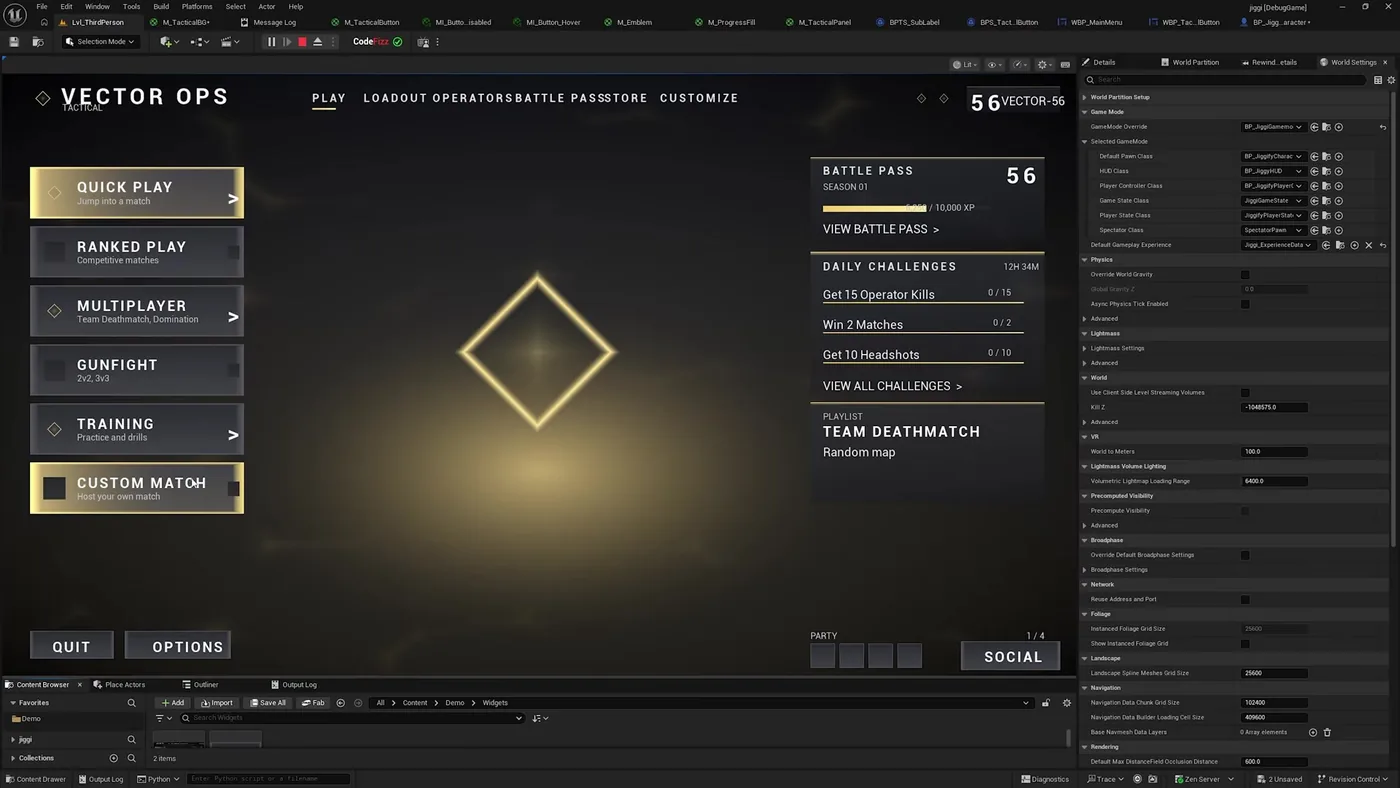
A tactical shooter main menu in Unreal Engine 5 with buttons, hover states, a battle pass panel, challenge counters and an animated emblem. The rule for the whole build was that not a single image could be used. Every visible element is a material.
That constraint is not a stunt. Materials scale to any resolution, recolour from a parameter, and animate without an atlas or a spritesheet, which is why UI built this way survives an art direction change that would otherwise mean re-exporting everything.
The finished menu running in the editor. Look at the tab bar along the top: the background, buttons, hover and disabled instances, emblem, progress fill and panel are all materials it authored, alongside the widget blueprints and text styles.
How do you build an Unreal UI from materials instead of images?
The input was a reference screenshot and a prompt saying to use Common UI, specifically common button and common text, and to use no images at all.
It started with the background material, then worked through the pieces: a tactical button material with instances for the normal, hover, pressed and disabled states, a panel material, a progress fill for the battle pass bar, and an emblem. Then the structural work that usually gets skipped in a demo: common button styles with those materials assigned, text styles defining headings separately from body text, and the widget blueprints wiring it together.
That is why the result behaves like a menu rather than looking like one. Hovering a button swaps a material instance because the style says so, not because anything was hand-wired per button.
How do you iterate on it once it exists?
The first background was static and read as a flat banner. The note given back was ordinary: it feels static, it should look like real fluid that keeps mixing and turning, not something panning from one side to the other.
The reasoning it came back with is the interesting bit. A single pan reads as a moving banner, so real fluid needs the warp field itself to evolve and rotate over time at different rates per octave, so the layers churn into each other. It moved that into one Custom HLSL node doing an iterative domain warp, noting that this is also faster than dozens of noise nodes.
It checked its own preview and rejected it
After building the fractal background it compiled clean at 46 nodes and 54 connections, then said the material editor preview was too small to judge and opened the actual menu to screenshot it in context. A material that looks right in a sphere preview can read completely differently behind a menu.
The emblem went the same way. Asked for an abstract shape that keeps shifting and shifting colour, tuned so it reads against a mostly gold background rather than disappearing into it.
The full run, including the two rounds of background feedback. Watch on YouTube.
Does this replace a UI designer?
Every improvement in that run came from a person looking at the screen and saying what was wrong. It feels static. It needs more life. The emblem should pop off the background. None of those are things the tool worked out on its own, and none of them are hard to say.
What it removes is the distance between the note and the result. Normally "make the background feel like moving fluid" means researching domain warping, writing the HLSL, wiring the node, compiling, fixing it, and previewing. Here it is a sentence, and the next version is on screen in a couple of minutes.
That changes what you can afford to try. Most UI ideas die because prototyping them properly costs a day and nobody wants to spend it on a maybe.
A whole menu, and not one image file in it. 1500+ commands across 45 categories, on UE 5.6, 5.7 and 5.8. Drive it from Claude Code, Cursor, VS Code, or any MCP client.
Three day free trial. No card, nothing locked off, and it runs on your real project.