How to create a Control Rig in Unreal Engine 5 (and automate the fiddly parts)
What a Control Rig actually needs: the control hierarchy, gizmo sizes, two bone IK and a pole vector that points the right way. Then how I automate the repetitive half, and the two things that went wrong doing it.
Rigging in Unreal is mostly not hard. It is fiddly. You build the same control hierarchy you built last time, size every gizmo by dragging it until it stops looking wrong, wire two bone IK, and then scrub the timeline hoping the knee bends the right way.
A Control Rig in Unreal Engine 5 needs five things, in this order: an asset created from your skeletal mesh, a hierarchy of controls parented to the bones they drive, gizmo shapes sized so an animator can actually see and click them, two bone IK on the limbs with a pole vector aiming each elbow and knee, and a check that the thing evaluates rather than merely existing.
Four of those five are describable, which means they are automatable. Below is each step, what it actually involves, and the command that does it, including the two places it went wrong, because those are the interesting parts.
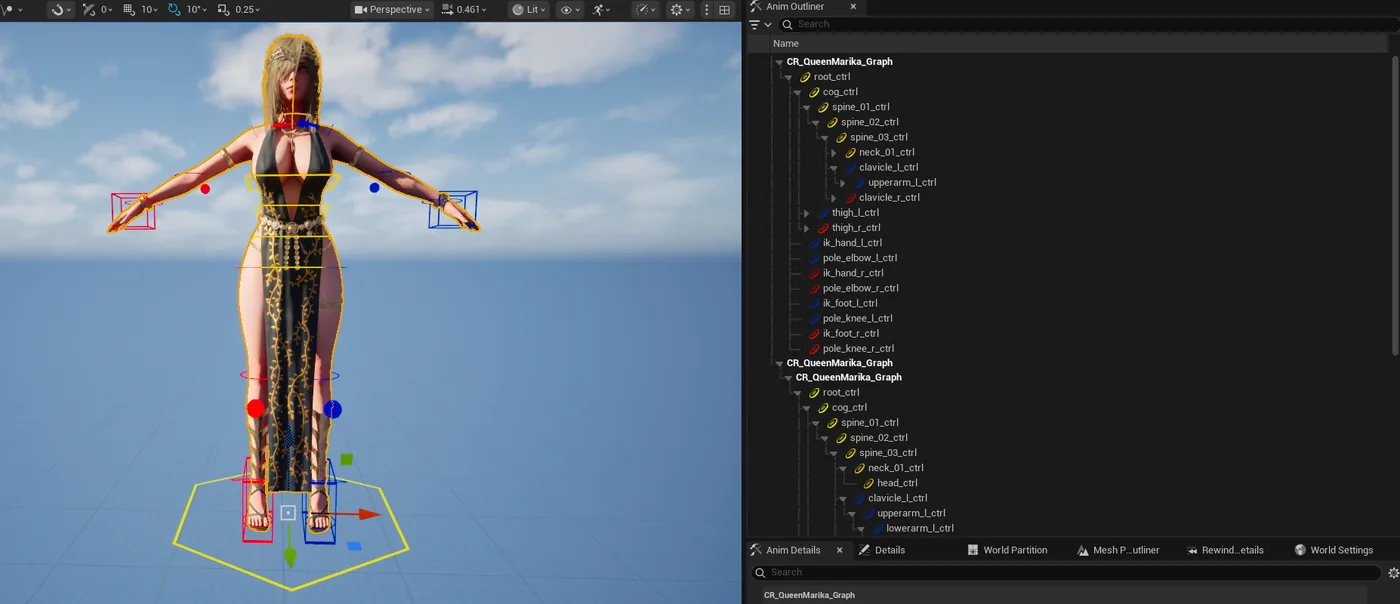
The finished rig. Gizmos sized from the mesh on the left, and on the right the hierarchy that produced them: root and centre of gravity, FK down the spine, then IK hands and feet with a pole vector for each elbow and knee. No control was placed by hand.
The whole thing running, 3:52, including the two rejections. Watch on YouTube.
Starting from the skeleton
One command creates the asset and imports the skeleton's bone hierarchy:
Create the rig from a skeletal mesh:
bash
cfa create_control_rig_from_skeleton --asset-path "/Game/Rigs/CR_QueenMarika" --skeleton-path "/Game/Characters/SKM_QueenMarika"
At this point you have bones and nothing to grab. An animator needs controls, and controls need to be in the right places with the right shapes.
Building the control hierarchy
This is the part that is genuinely tedious by hand. Every control is a create, a parent, a rename, and a transform, repeated forty times. It goes in one call:
Build the whole hierarchy atomically:
bash
cfa build_rig_hierarchy --asset-path "/Game/Rigs/CR_QueenMarika" --json '{"elements":[{"type":"control","name":"root_ctrl","shape":"Circle_Thick"},{"type":"control","name":"spine_01_ctrl","parent":"root_ctrl","bone":"spine_01"},{"type":"control","name":"spine_02_ctrl","parent":"spine_01_ctrl","bone":"spine_02"}]}'
Note
Atomically matters here. A hierarchy that half-builds because element nineteen had a typo leaves you worse off than not starting, so the call either lands or it does not.
The gizmo sizing problem
Every rigger knows this one. A freshly created control is a unit circle sitting inside the character's ribcage, invisible and unclickable, and you fix it by dragging a scale value until it looks about right. Forty times.
It can be measured instead. The command reads the actual skinned vertices for each bone and sizes the shape to fit them:
See what it would do without touching anything:
bash
cfa fit_rig_control_shapes --asset-path "/Game/Rigs/CR_QueenMarika" --dry-run true
Then apply it:
bash
cfa fit_rig_control_shapes --asset-path "/Game/Rigs/CR_QueenMarika" --margin 1.25
The dry run habit is worth keeping. It prints the size it computed per control, so an obviously wrong number shows up before it is applied to forty gizmos at once.
Where it went wrong the first time
One control came out enormous. A 143 centimetre circle around a bone that should have had a five centimetre one.
The cause turned out to be a socket. The fitting logic walks a bone's children to work out how far the shape needs to reach, and a socket parented at the bone's origin counts as a child sitting at distance zero in a way that skewed the measurement. Not a bug in the character, and not something you would ever guess from looking at the result.
The fix was to zero the socket's local translation rather than delete it, because deleting a socket breaks whatever was attached to it. The point is not the specific bug. It is that a dry run surfaced a single absurd number in a list of forty reasonable ones, which is exactly the kind of thing you do not notice when you are dragging sliders.
Two bone IK and the pole vector
Pole vector placement is the other job that is pure arithmetic dressed up as art. The knee has to point the way the foot points, and the maths for that is knowable from the bones:
Place the pole vector from the limb's own geometry:
Passing the two facing bones is what stops the knee pointing sideways. Without them the direction is a guess, and a guess is wrong about half the time.
The second thing that went wrong
The rig reported healthy and the controls did nothing. Every status was green, the hierarchy was correct, the shapes were right, and moving a control moved nothing.
This is the trap in rigging automation generally: a status that says success only tells you the call did not error. It does not tell you the rig evaluates. The only thing that proves a rig is alive is running it and watching what moved.
Check the controls are wired at all:
bash
cfa validate_rig_controls --asset-path "/Game/Rigs/CR_QueenMarika"
Then actually run it over an animation:
bash
cfa simulate_rig --asset-path "/Game/Rigs/CR_QueenMarika" --anim-sequence "/Game/Anims/A_Walk" --frames 90
The simulation is headless. It reports which bones moved and by how much, whether limbs crossed through each other, whether anything went below the floor, and whether any transform came back NaN. That is a verdict, not a status.
The check that actually proves it
Nudging a bone and measuring whether the chain responded is the real test. A deviation check on local transforms will happily report zero movement on a working rig, because chain solvers write global transforms and drag their children along with them.
Is it worth doing this way
For a hero character you are art-directing, probably not end to end. You will want your hands on the controls that carry performance.
For the other forty characters, the ones that need a competent rig and no more, this is the difference between a day and twenty minutes. It is also repeatable, which matters more than it sounds: the same commands run against the next skeleton produce the same rig, instead of whatever you happened to do differently on a Friday.
Worth saying plainly: Control Rig physics is Beta in 5.8 and Experimental before that. Epic's own flags say so. If you go down the jiggle and secondary motion route, budget iteration time and do not trust a green status.
Trying it on your own character
The full Control Rig walkthrough, with every validation gate spelled out, is in the docs, and every rigging command is listed in the Control Rig reference.
Try it on your own project
CodeFizz Editor Agent
Control Rig is one of 45 categories, and the rest work the same way. 1500+ commands across 45 categories, on UE 5.6, 5.7 and 5.8. Drive it from Claude Code, Cursor, VS Code, or any MCP client.
Three day free trial. No card, nothing locked off, and it runs on your real project.