Using an AI assistant inside Unreal Engine 5: one real run, every command
A real run: what I asked for, every command the assistant actually ran, the bit it got wrong, and how it fixed itself. Plus what it is genuinely good at, and what it is not.
You point an AI assistant at a running Unreal Editor, ask for something in plain English, and it calls real editor commands to build it. Not code you paste in afterwards. The asset appears in your content browser while you watch.
I build the plugin that does this, so take the enthusiasm with the appropriate pinch of salt. What I can do is show you an actual run, including the bit where it got something wrong and fixed itself, because that part is more convincing than any feature list.
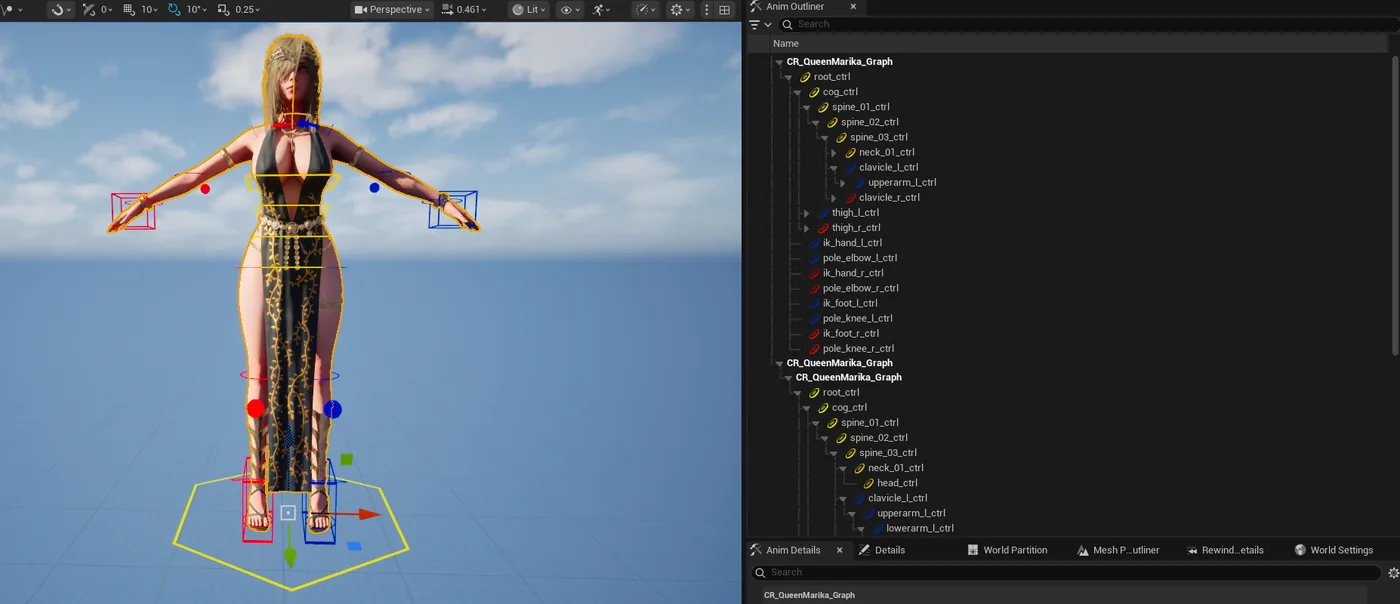
One of these runs, finished. A Control Rig with the whole control hierarchy built, gizmos measured from the mesh rather than eyeballed, and IK on all four limbs. Nothing here was placed by hand.
Getting it talking to the editor
Three commands and your project is reachable. The plugin runs a small bridge inside the editor and the CLI talks to it. Your AI assistant then drives the CLI.
Install the free CLI:
bash
irm https://codefizz.dev/install.ps1 | iex
Sign in:
bash
cfa login
Install the plugin into your engine:
bash
cfa install-plugin "E:/Unreal/UE_5.8"
Then the step people skip, and then regret skipping:
Teach the assistant what the commands actually do:
bash
cfa skill install
Without that, the model guesses at parameter names. With it, it looks things up before calling anything. The difference in how often the first attempt works is not subtle.
Check the editor is reachable:
bash
cfa health_check
What I asked for
With the editor open, I asked Claude for a spark effect. Nothing clever, phrased the way you would ask a colleague:
"Make me a Niagara system called NS_Sparks with an emitter that throws sparks upward. Give it a decent spawn rate and let me tint the colour from Blueprint."
What it actually ran
It did not write me a tutorial. It called commands, in this order:
Created the system:
bash
cfa create_niagara_system --asset-path "/Game/VFX/NS_Sparks"
Added an emitter from a template:
bash
cfa add_niagara_emitter --system-path "/Game/VFX/NS_Sparks" --template "Fountain" --emitter-name "Sparks"
Looked up a module rather than guessing the path:
bash
cfa list_niagara_modules --search velocity
Added it to the right stage of the stack:
bash
cfa add_niagara_module --system-path "/Game/VFX/NS_Sparks" --emitter-name "Sparks" --module-path "/Niagara/Modules/Update/Velocity/VortexVelocity.VortexVelocity" --script-usage ParticleUpdate
cfa add_niagara_user_parameter --system-path "/Game/VFX/NS_Sparks" --parameter-name "SparkColor" --parameter-type "LinearColor"
Compiled it:
bash
cfa compile_niagara_system --system-path "/Game/VFX/NS_Sparks"
The bit that went wrong
The velocity module landed in the wrong stage first time. It compiled fine and the particles did nothing, which is the most annoying category of Niagara bug because there is no error to read. A module in EmitterUpdate that belongs in ParticleUpdate is simply ignored.
What made it recoverable is that the assistant could look:
Read the stack back:
bash
cfa get_niagara_modules --system-path "/Game/VFX/NS_Sparks" --emitter-name "Sparks"
It saw the module sitting in the wrong stage, removed it, added it again with the right --script-usage, and recompiled. I did not tell it to do that. I said "the sparks are not moving".
This is the whole point
An assistant that can only write is guessing. One that can compile, read the result back, and correct itself is doing the job. Every capability list in this space is really a proxy for whether that loop closes.
How much of the editor it can actually reach
Niagara is one category out of 28. The reason I keep pushing on coverage is that a tool which reaches half the editor sends you back to clicking for the other half, and a workflow with a hole in it is not really a workflow.
What is reachable today, all of it editor side and all of it callable from a prompt:
Insights profiling, read a trace and get a verdict
That is 1500+ commands across 45 categories, and the number is generated from the CLI source rather than estimated, because I got tired of it being wrong in five places at once.
The profiling one is the one that changes how people work. The assistant can run a trace, read which node cost the frame, change the thing, and re-run to check it actually helped. That is a loop you would otherwise do by hand a dozen times an afternoon.
What it is not good at
Taste. It will build the effect you described, not the effect you imagined, and the gap between those is your job. I have not once had it produce something I would ship without touching.
Where it earns its place is the tedious, well-defined, repetitive half: the Blueprint graph you have wired forty times, the material you can describe faster than you can build, renaming a hundred assets and fixing the redirectors afterwards.
One thing that surprises people about engine versions
Epic ships its own MCP server now, and it is worth trying before you pay anyone anything. The catch is that it exists in Unreal Engine 5.8 only. On 5.6 and 5.7 there is no plugin to enable and no flag to flip, because engine features ship with engine versions and are not backported.
You can check your own install in about ten seconds. Look for these folders:
Present on 5.8, absent on 5.7 and 5.6. That matters more than it sounds, because studios mid production do not upgrade engine versions to try an experimental feature. A project on 5.7 has a build pipeline, a plugin set and a QA baseline pinned to it.
So if you are on 5.6 or 5.7, third-party is the only route there is. Mine is built and tested separately against all three versions, because the engine ABI differs between them and a single universal binary is not a thing that can exist.
And if you are on 5.8, try Epic's first. It is free and it is first party. The question to ask after an hour with it is simply how much of the list above you still need, because that is the only thing the decision actually turns on.
Trying it yourself
The full Niagara walkthrough, with every failure mode spelled out, is in the docs. If you would rather see the whole command surface first, it is searchable on the tools page.
Try it on your own project
CodeFizz Editor Agent
Everything in this post was one assistant, one editor, and the commands above. 1500+ commands across 45 categories, on UE 5.6, 5.7 and 5.8. Drive it from Claude Code, Cursor, VS Code, or any MCP client.
Three day free trial. No card, nothing locked off, and it runs on your real project.