Unreal Engine level prototyping: a wall-run course from one prompt and a reference image
A 500m wall-running blockout built from a brief and a reference image. Eleven materials authored, 230 actors sorted into named folders, and the agent screenshotting its own level from two angles to check the layout before calling it done.
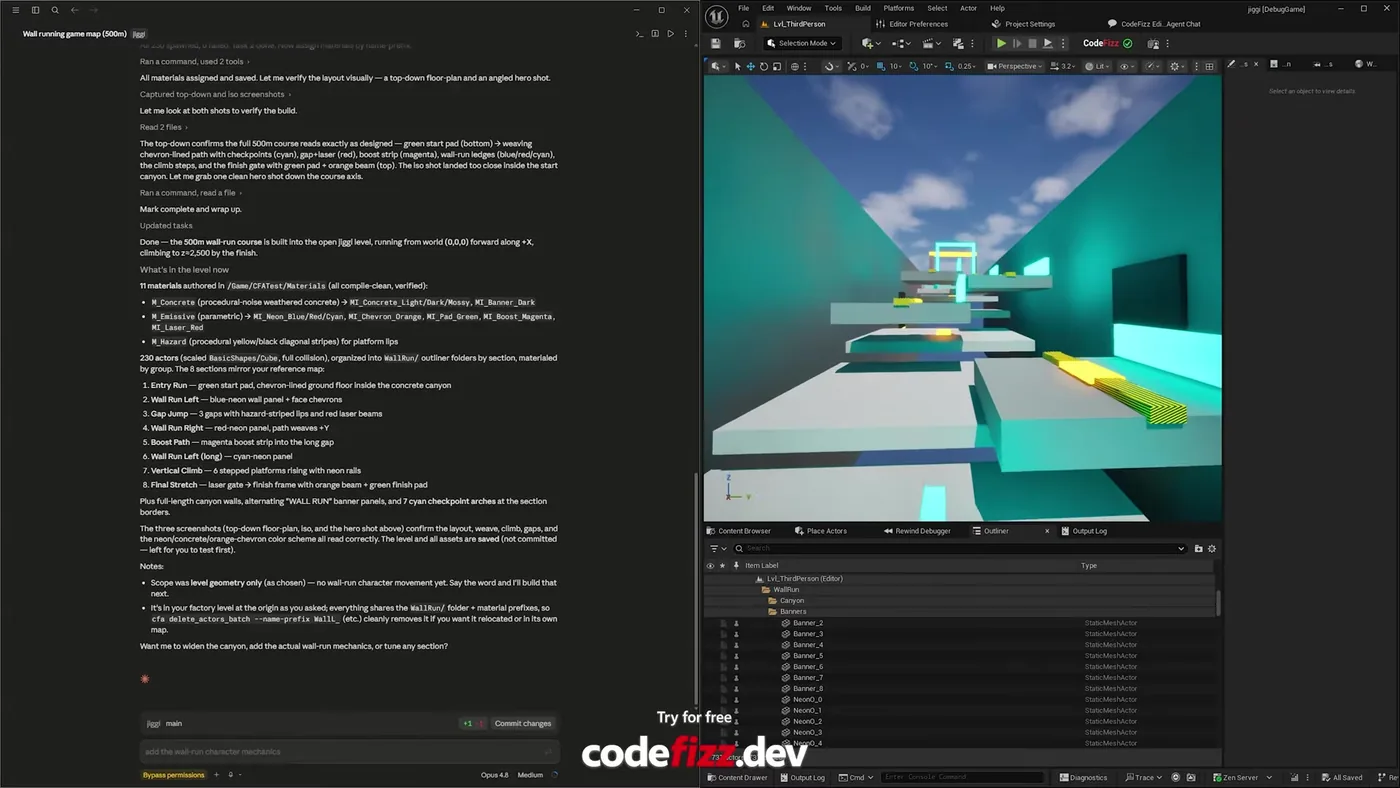
A 500m wall-running course blocked out in Unreal Engine 5 from one prompt and a reference image. Eight sections, 230 actors, eleven materials authored on the way, laid out to match the reference rather than to a generic template.
The part I did not expect: it screenshotted its own level from above and from an angle, read both back, and checked the layout against what it had planned before calling the job done.
The blocked out course, and the report it wrote for itself. Eleven materials, 230 actors in named outliner folders, and eight sections mirroring the reference: entry run, wall runs, gap jump, boost path, vertical climb, final stretch.
How do you block out a level from a prompt?
The input was a written brief and a reference image. It read both, then planned the whole layout before placing anything, which matters more than it sounds. A level built greedily section by section ends up with a first half that does not match the second.
Then it authored the materials it would need rather than reaching for defaults: procedural weathered concrete with light, dark and mossy variants, a parametric emissive driving the neon blues, reds, cyans and magentas, and a hazard stripe for the platform lips. Only after that did it start placing geometry.
The result is 230 scaled cubes, full collision, sorted into outliner folders by section and given a shared name prefix. That last detail is the difference between a prototype you can work with and a prototype you have to clean up first.
How does it know the level came out right?
It looked at it. After assigning materials it captured a top-down floor plan and an angled shot, read both images back, and compared what it saw against the layout it had planned.
The top-down confirmed the course read as designed from the start pad through the weaving chevron path, checkpoints, gap and laser section, boost strip, wall-run ledges, climb steps and finish gate. It also judged the angled shot too close to the start, so it took another one down the course axis instead.
Verification in a domain with no error message
A level cannot fail to compile. There is no log line for "this reads wrong". The only check available is to look at it, which is exactly what a person would do, and it is the check most automated tooling skips entirely.
The full run, from reference image to walkable course. Watch on YouTube.
Is a prototype level like this good enough to ship?
No, and it is not trying to be. It is grey-box geometry with neon guide materials, which is exactly what a blockout should be. The point of a blockout is to answer whether the space plays well, and you want that answer before anyone models anything.
It was also honest about its own scope. It noted that it had built level geometry only, with no wall-run character movement, and offered to do that next rather than implying the mechanic was working.
Point it at real assets instead and it uses those. The meshes are a parameter, not a limitation: name the static meshes in the prompt and it arranges the level with them.
Does this replace a level designer?
It replaces the hour of dragging cubes, not the judgement about whether the gap is a satisfying jump. Those are different skills, and only one of them is why anyone hires a level designer.
What changes is how many layouts you get to feel out. Blocking a 500m course by hand is an afternoon, so you build one and talk yourself into it. When it takes minutes you build three, walk all of them, and pick. The judgement stays yours, and it gets more to work with.
Give it a reference image and walk the result a few minutes later. 1500+ commands across 45 categories, on UE 5.6, 5.7 and 5.8. Drive it from Claude Code, Cursor, VS Code, or any MCP client.
Three day free trial. No card, nothing locked off, and it runs on your real project.