Low FPS in Unreal Engine 5: how to find what is actually slow, from 3 FPS to 90
A level ran at 3 FPS. A trace showed one Blueprint Event Tick using 301 of 312 ms per frame. The three steps to find it, the real numbers, and the fix that took it to about 90 FPS.
Low FPS in Unreal Engine 5 comes from one of two places. Either the game thread is too slow, which means your game logic, or the GPU is too slow, which means your graphics. To find out which one, and then what exactly, you record a trace with Unreal's own profiler and follow the time down from the whole frame to one function.
I did that on a level that ran at 3 FPS. The cause was one Blueprint. Its Event Tick used 301 of the 312 ms in every frame. After the fix, the same level runs at about 90 FPS. I did not read the trace myself. I gave that part to an AI agent, and it had the answer about three minutes later. This post shows the steps, the numbers, and the parts that did not work the first time.
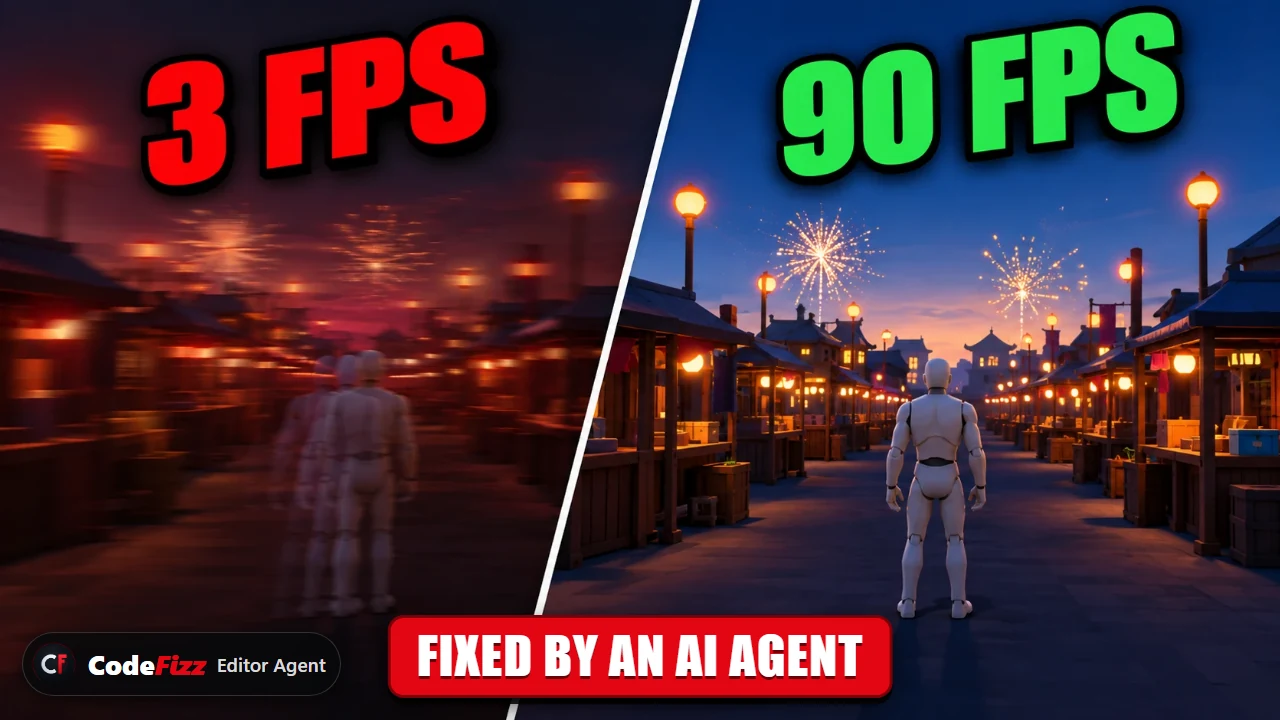
The same level before and after. I made it slow on purpose, and I did not tell the agent where the problem was.
How do you find what is causing low FPS in Unreal Engine 5?
You go down in three steps, and you do not skip one.
First the whole frame. How long is one frame, and which part uses it: the game thread, the render thread or the GPU?
Then the owner. Inside the slow part, which class or system uses the time?
Then the exact thing. Inside that class, which function, and how many times does it run in one frame?
By hand, this means a trace in Unreal Insights and a lot of careful reading. With the profiling commands the agent records the same trace and asks it questions. These are the real commands for a play session:
Start recording, and stop by itself when Play ends:
bash
cfa performance_start_trace --channels "cpu,gpu,frame" --until-pie-end
Press Play, wait, then stop Play:
bash
cfa play_in_editor
Load the trace that was recorded:
bash
cfa performance_stop_trace
Step one, the whole frame:
bash
cfa performance_analyze_insight --query diagnose --window pie
Step two, the top timers on the game thread:
bash
cfa performance_analyze_insight --query breakdown --thread GameThread --window pie
Step three, what runs inside one Blueprint:
bash
cfa performance_analyze_insight --query calltree --timer-name "BP_MarketVisitor_C" --window pie
What did I ask the agent to do?
I gave it the symptom and nothing else. No Blueprint name, no hint about lights or effects.
The whole prompt
My game feels really slow in this level and I don't know why. Hit Play in the editor yourself, profile it while it runs, then stop Play. I want to know where the time is actually going. Start from the whole frame and work your way down until you can point at the exact thing that is eating it. Give me real numbers for everything you say, and check that the numbers make sense before you tell me. Don't guess, and don't change or fix anything yet.
Is the low FPS from the CPU or the GPU?
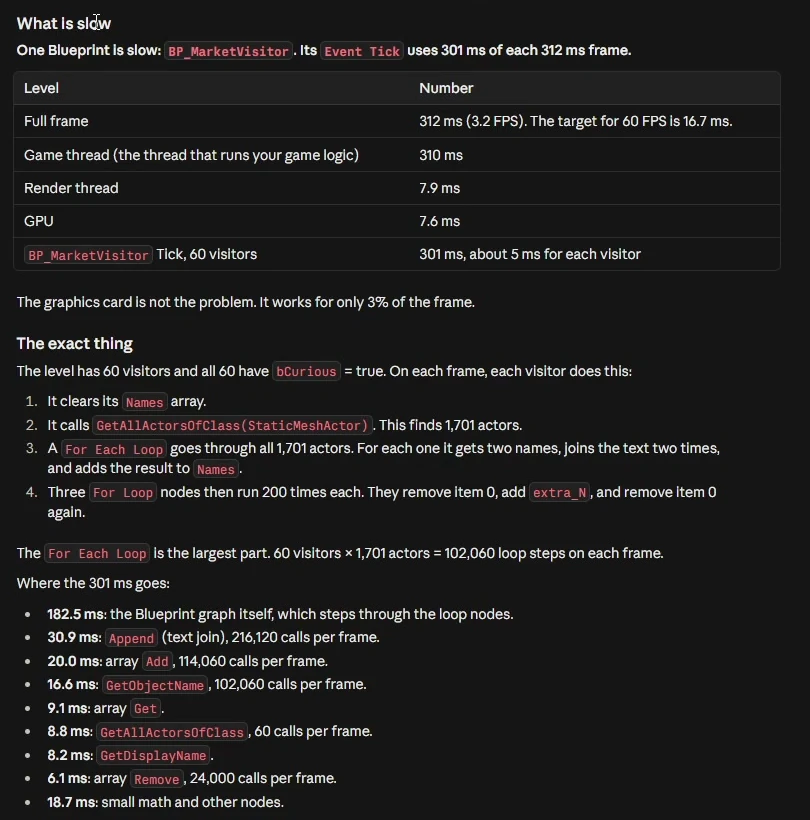
This is the first number to read, because it decides where you look next. In this level one frame took 312 ms, which is 3.2 FPS. The game thread used 310 of those 312 ms. The render thread used 7.9 ms and the GPU used 7.6 ms.
So the graphics card worked for only 3% of the frame. Lower shadow quality or a smaller resolution would have changed nothing here. The problem was game logic. If your numbers are the other way round, with a GPU time close to the frame time, then you look at the render passes and not at your Blueprints.
The report, about three minutes after the prompt. One Blueprint, and a list of where its 301 ms go, node by node.
Why was one Blueprint Event Tick so slow?
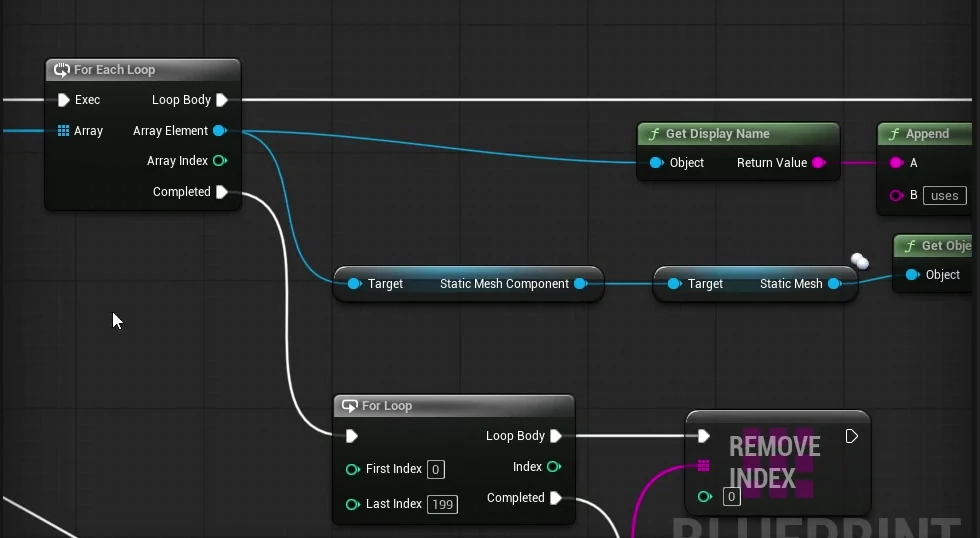
The level had 60 visitor actors. On every frame, each visitor called Get All Actors Of Class and received all 1,701 static mesh actors in the level. Then a For Each Loop went through the whole list. For each mesh it read two names, joined them into one text, and added the text to an array. After that, three For Loops removed and added 200 items each.
60 visitors times 1,701 meshes is 102,060 loop steps in every frame. And the result was never used. The graph wrote the list and nothing read it.
The loop that ran on Event Tick. Every node is cheap alone. 102,060 times per frame, it is not.
Is Get All Actors Of Class on Event Tick the problem?
This surprised me. Get All Actors Of Class is the node everybody warns about, and it was a small part: 8.8 ms for 60 calls per frame. The large part was the loop that came after it. 182.5 ms went to the Blueprint graph itself, stepping through the loop nodes. The text joins cost 30.9 ms for 216,120 calls, and the array adds cost 20 ms for 114,060 calls.
So the rule I take from this is wider than one node. A large loop in a Blueprint on Event Tick is expensive, whatever is inside it. The trace is what tells you which part to cut.
How do you know the profiler did not cause the slow frame?
A trace costs time too, so this is a fair question. The agent checked it without being asked for that exact test. It pressed Play a second time with nothing recording and measured again. The median frame was 304 ms without a trace, against 311.5 ms with one. The recording was not the slow part.
It also checked that its own numbers agree with the level. The parts add up to the total, and 102,060 calls divided by 60 visitors is 1,701, which is the number of static mesh actors in the level. Then I did my own check. I unplugged the wire from Event Tick by hand and pressed Play. About 100 FPS. The diagnosis was right.
How was the low FPS fixed?
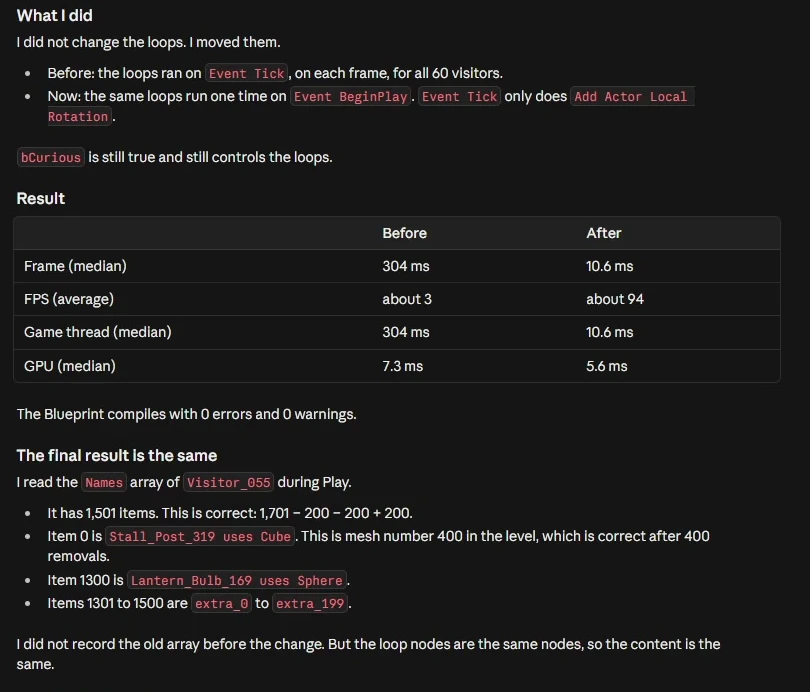
I plugged the wire back in and asked for a fix that keeps the same final result. The agent did not rewrite my logic. It moved the heavy loops from Event Tick to BeginPlay, so they run one time and not on every frame. Event Tick keeps only the small rotation.
Then it measured again. One frame went from 304 ms to 10.6 ms, and the average went from about 3 FPS to about 94. It also read the list from a live visitor during Play, to check that the content is the same as before: 1,501 items, which is 1,701 minus 200, minus 200, plus 200.
Measured again after the change, not assumed. The Blueprint compiles with 0 errors and 0 warnings.
The trade off it told me about
The list is now built one time, when Play starts. If static meshes are added or removed during the game, the list does not update, and before the change it updated on each frame. The loops also still cost about 300 ms in total, one time, at the start of Play. For this level that is fine. For yours it may not be, and that decision is yours.
What went wrong along the way?
Two small things. One of the first commands failed while it set up the recording, and it ran the step again. Later, when it wanted to read the list from a live visitor, the first try did not find the actor, because an actor label in a Play session has an extra part in its name. It corrected the label and tried again.
Neither one needed me. I mention them because a run where nothing fails is not what real use looks like.
The full run in under three minutes, with the real frame rate on screen. Watch on YouTube.
Does this replace the profiler, or the programmer?
No. The profiler is still Unreal's own, and the trace is a normal file that you can open in Unreal Insights. The agent does the slow reading and comes back with numbers you can check. You still decide what to fix.
The limits are real, so here they are. I made this level slow on purpose, with one large problem. A real project usually has several smaller ones, and you repeat the steps for each. The profiling commands need Unreal Engine 5.7 or 5.8, they do not work on 5.6, and the plugin runs on Windows only. On the CPU side the trace goes down to the exact Blueprint node. On the GPU side it names render passes, not single objects, so a GPU problem takes more questions.
Open the level that feels slow and ask why. 1400+ commands across 37 categories, on UE 5.6, 5.7 and 5.8. Drive it from Claude Code, Cursor, VS Code, or any MCP client.
Three day free trial. No card, nothing locked off, and it runs on your real project.