How to test Unreal Engine multiplayer with AI: lag, packet loss and what every player sees
A real run: a server and two clients in one editor, 5% packet loss and 100 to 200 ms of lag, 31 movement corrections counted, and a value that did not replicate.
To test Unreal Engine multiplayer, you run a server and several clients, make the network worse on purpose, move a player, and check two things: does every client see the same game as the server, and does the server have to correct the player's movement. Unreal's Play In Editor can run a listen server and clients in one editor, and the engine already has network emulation and a correction report built in.
The slow part is reading it all: every client window, every connection, every correction. I gave that part to an AI agent. In one session it ran a server and two clients, added 100 to 200 ms of lag and 5% packet loss, walked a player around, counted 31 movement corrections from the server, and caught a value that did not replicate. This post shows the real commands, the real numbers, and the two things that were wrong the first time.
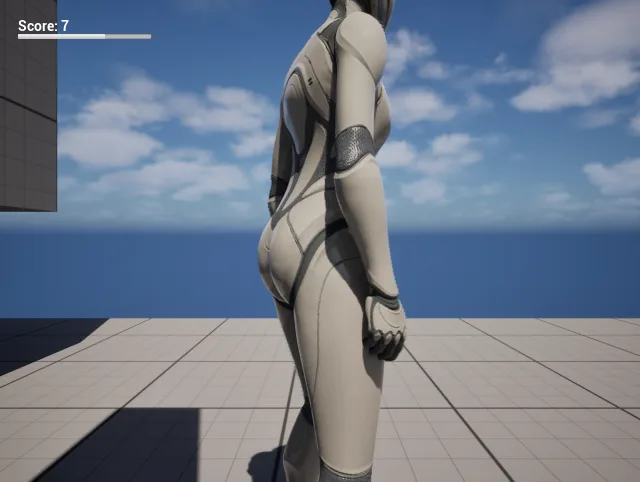
What client 1 saw, captured by the agent, HUD included. The first version of this picture had no HUD at all.
How do you test multiplayer in Unreal Engine without other players?
You play every player yourself, in one editor. Play In Editor with the net mode set to listen server and three players gives you a server with its own player, plus two clients, each in its own window. They all run in the editor's process, so one tool can see all of them at once.
A listen server and two clients:
bash
cfa play_in_editor --mode new_window --net-mode listen_server --num-players 3
Every world: time, pause, game mode, each player with pawn and ping:
bash
cfa get_runtime_world
The first thing the agent checked was the shape of the session. The server held all three player controllers. Each client held only its own one, which is how Unreal replication works: a client never gets another player's controller. If your game reads "player controller 0" on a client and expects someone else's, this is where you see it.
How do you simulate lag and packet loss in Unreal?
Unreal has packet simulation built in. The Bad profile in the engine's config adds 100 to 200 ms of lag in each direction and drops 5% of packets each way. You can set it in Editor Preferences before Play, or change it while the game runs:
Apply the engine's Bad profile to the server and both clients:
bash
cfa set_network_emulation --profile Bad
Measure what it did, per connection:
bash
cfa get_runtime_network --world client1
A few seconds later client 1 measured a ping of 695 ms, 5.3% loss on what it received and 13.4% on what it sent. That is much worse than the profile sounds, and it is the point: lag on both sides adds up, and a lost packet costs a resend. Test with the number your players will actually feel, not the one in the settings.
Is the server correcting my player's movement?
Character Movement predicts on the client and the server checks every move. When the two disagree, the server sends a correction and the client snaps back. A few small corrections under bad network are normal. Large ones, or many with a good network, mean a bug: usually a speed or a movement setting that is different on the client and the server.
Walk client 1 forward, then diagonally, stop, and count the corrections:
bash
cfa watch_runtime_movement --input-world client1 --steps '[{"keys":["W"],"seconds":2},{"keys":["W","D"],"seconds":2},{"keys":[],"seconds":1}]'
Under the Bad profile, the server corrected client 1's character 31 times in those five seconds. The largest correction was 39.4 units and the average 24.6, so the verdict was pass with warnings: real corrections, all small. At its worst, the client's own copy stood 258 units apart from the server's, which is what a 600 units per second run and over half a second of ping look like. A watch with the emulation off and nobody moving counted 0 corrections and passed.
What went wrong the first time
The first version said client 2 had received exactly as many corrections as client 1, but only client 1 had moved. Each client names its own pawn the same way (BP_..._C_0 in its own world), so the name in the engine's report could not tell them apart. The fix was to note which play world the engine was running when it wrote each report. After that, client 1 received its corrections and client 2 received none, which is what happened.
How do I check a value replicated to every client?
Read the same actor on the server and on every client, side by side. To test this, the agent changed one player's max walk speed on the server only, to 333, and compared:
Change a value on the server only:
bash
cfa set_runtime_actor_properties --actor pawn:1 --properties '{"CharacterMovement.MaxWalkSpeed":333}'
Compare the server with every client copy:
bash
cfa compare_runtime_actor pawn:1 --properties CharacterMovement.MaxWalkSpeed
The server said 333 and both clients said 600, and the verdict was fail. Max walk speed does not replicate. Set it only on the server and the client keeps predicting at the old speed, so the server has to correct it, which is the kind of bug the movement watch above finds from the other side. Values that do replicate, like a reference to the player state, matched even though each world has its own object, because the comparison follows the client's own copy.
Can I see what each player sees, UI included?
The in-game widgets of client 1, with the text on screen:
bash
cfa get_runtime_widgets --world client1
A picture of client 1's view:
bash
cfa take_screenshot --world client1
The widget list said client 1 had one widget on screen, owned by its own controller, with a text reading Score: 7, and client 2 had none. That is the check for UI that shows up for the wrong player, or only on the server.
What went wrong the first time
The first picture of client 1 showed the level and no HUD. The game's UI is not part of the 3D image: Slate draws it on top. Reading the viewport's pixels gave the 3D scene only, so the capture now takes the whole game view widget, which is what you see in the picture above.
What this does not do
All of this needs the clients in the editor's own process, which is the default (Run Under One Process). A client started as its own program cannot be reached. Projects that use Iris replication cannot match a client's copy to the server's actor, so the comparison stops and says so, and the movement watch counts only the server's corrections. The correction count comes from Character Movement's own report, so other movement systems are not counted. And the plugin runs on Windows, on Unreal Engine 5.6, 5.7 and 5.8.
It does not replace testing with real people on real networks either. It finds the bugs you can find alone: values that do not replicate, movement that the server keeps fixing, UI on the wrong screen, before anyone else has to play.
Start a server and two clients, then ask what goes wrong under lag. 1600+ commands across 45 categories, on UE 5.6, 5.7 and 5.8. Drive it from Claude Code, Cursor, VS Code, or any MCP client.
Three day free trial. No card, nothing locked off, and it runs on your real project.